
Somewhere in your business there's a person everyone asks. They know where the refund policy lives, which version of the contract template is the real one, and why that supplier gets 60-day terms. When they go on holiday, things get slow. When they leave, things get worse.
A knowledge base assistant is a way to stop relying on that one person. Not by replacing them, but by making what they know (and what's buried in your shared drive) searchable in plain English.
Where AI actually fits
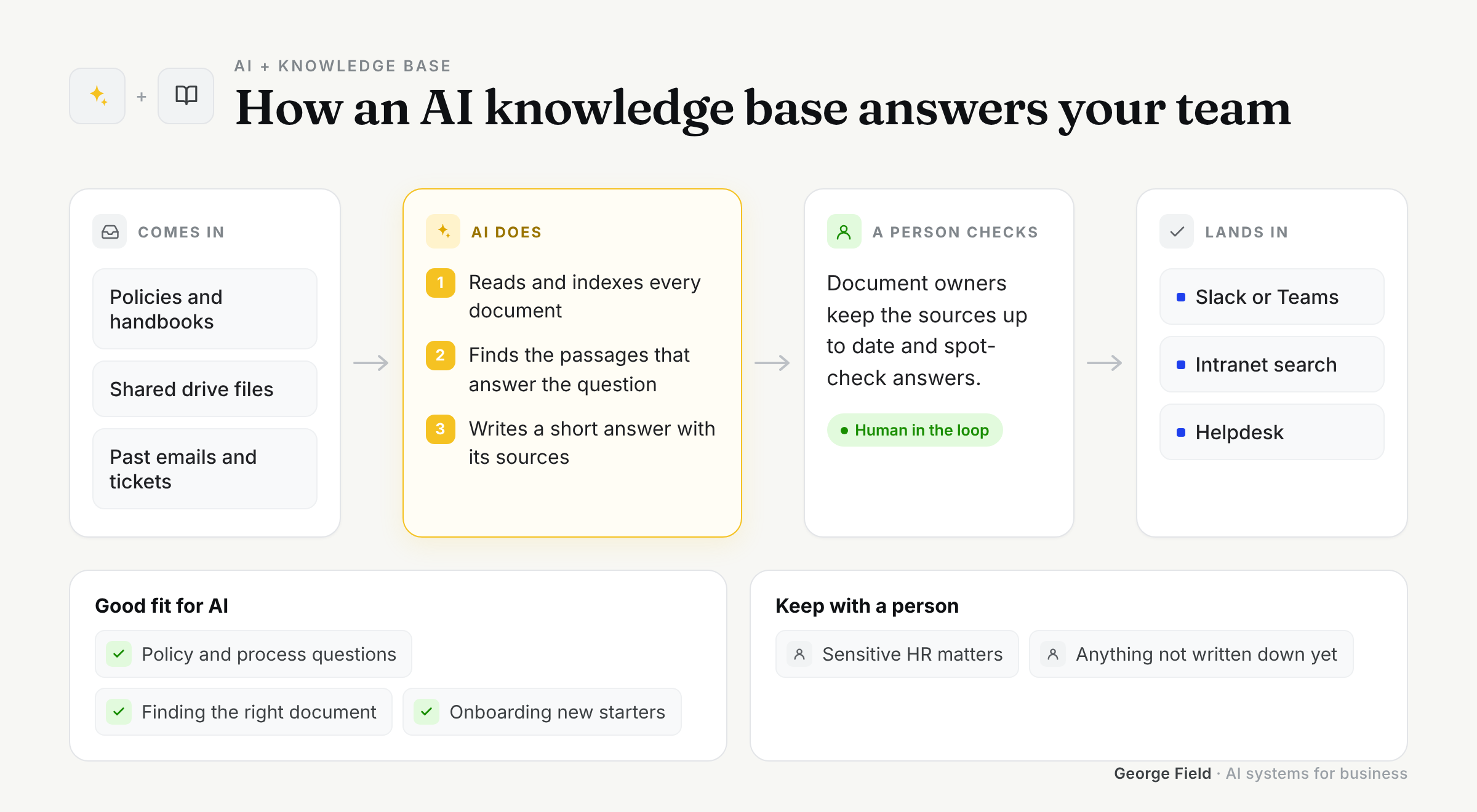
The technique behind most of these tools is called retrieval-augmented generation, or RAG. It sounds grand. It isn't. The system searches your documents for the passages that answer a question, then asks a language model to write a reply using only those passages, and shows you where each part came from.
That last bit matters more than anything else. An answer without a source is a guess wearing a suit.
What it's great at
- Finding the right paragraph across thousands of documents in seconds
- Answering the same internal questions for the fiftieth time without sighing
- Getting new starters up to speed without a week of shadowing
- Summarising long policies into something people will actually read
What it's not great at
- Knowing things that aren't written down. If the answer lives in someone's head, AI won't find it
- Sorting out contradictory documents. If you have three versions of the holiday policy, it'll find all three
- Judgement calls. It can tell you what the policy says, not whether to bend it for a good customer
- Keeping itself up to date. Someone has to own the content, or it slowly drifts out of date
How to implement it
Start with one team and one set of documents. HR policies or a product FAQ are good candidates because the questions repeat and the answers are already written down.
Before building anything, clean up the obvious mess: delete the duplicates, mark the current versions, and agree who owns what. It's boring. It's also where most of the quality comes from.
Then build a small assistant, put it in front of five people for two weeks, and read every question they ask. The questions tell you what's missing far better than any workshop.
How I approach it
I've built RAG pipelines and document pipelines that handled thousands of files, and the lesson is always the same: the model is the easy part. The hard part is the documents, the permissions and the edge cases.
So every assistant I build cites its sources, respects who's allowed to see what, and says "I don't know" when the answer isn't there. That last one feels like a weakness. It's actually why people end up trusting it.
Ideas that work
- An internal help desk that answers HR and IT questions in Slack or Teams
- A sales assistant that pulls answers from product specs and past proposals
- A support tool that drafts replies from your help centre for an agent to check
- An onboarding guide that new starters can ask anything, at any hour, without feeling daft
If you're not sure your documents are in good enough shape for this, that's a perfectly good place to start the conversation. Book a call and we'll look at what you've got.
